
(801) 477-6186 Book a consult Menu

Run the business betterWhat we actually build

Automation and custom software, built around how your business already works.

Alpine Ops builds the fix for the manual work in your business: the systems you already use, connected so information is typed once; paper forms turned into data; quotes and invoices drafted for you; and simple tools shaped around your people. Every build is a fixed price, typically $2,500 to $15,000 depending on scope, and you know the exact price before work starts.

Book your free 30-minute consult

Free. 30 minutes. No obligation.

See what we build

01What it is

Software that does the retyping, so your people don't have to.

Automation means the computer handles the repetitive parts of a process: copying, retyping, filing and first drafts. Custom software means a tool built for the way your business works, instead of bending your business to fit a product.

We build both, for one business at a time, starting from the recommendations in your AI process analysis. Nothing here requires you to understand AI. You'll see the same screens, forms and phone your people use today, with fewer steps done by hand.

Who it's for

  • Clinics and offices
  • Contractors
  • Field service
  • Trucking
  • Shops and retail
  • Restaurants
  • Professional services

What changes, and what doesn't

Your software
Stays. We connect the systems you already use instead of asking you to switch.
Your process
Same steps, fewer by hand. The typing and copying go away. The judgment stays.
Your people
Still decide what matters. Anything that goes out to a customer waits for a person.
Your price
Fixed. Typically $2,500 to $15,000, known before any work starts.

02What we build

Seven kinds of things we build, and what each one looks like in a real business.

A build can combine several of these. Each one comes with an example from a different kind of Basin business. The examples are made up and the numbers are illustrative, but the work is the kind we do.

2.1

Entered once, everywhere

We connect the systems you already use so a customer, job or ticket is typed once and flows to scheduling, billing and payroll on its own.

Fixes: double entry, typos between systems, and "which copy is right?"

Example: a clinic front deskExample
  1. BeforeA new patient's details are typed into scheduling, then billing, then the reminder list.
  2. AfterTyped once at the front desk. Scheduling, billing and reminders fill in from that one entry.

Three entries become one.Illustrative
2.2

Paper to data

Snap a photo of a paper ticket, form or invoice. It's read and entered for you, and a person checks anything the system isn't sure about.

Fixes: paper riding in the truck all week, and Friday afternoons spent keying it in.

Example: a contractor's work ordersExample
  1. BeforeSigned work orders ride in the truck until Friday, then the office types every one.
  2. AfterThe tech photographs it on the tailgate. It's entered that day, and the office checks only the ones flagged.

About 60 a week entered. Six checked by hand.Illustrative. See it up close

2.3

Reports that build themselves

Daily or weekly reports and dashboards pulled from all your sources, on a schedule, without anyone copying numbers into a spreadsheet.

Fixes: the hand-built Friday report, and numbers that don't agree with each other.

Example: a retail storeExample
  1. BeforeEvery Monday the owner pulls sales, stock and staff hours from three places into one sheet.
  2. AfterA one-page report is waiting at 6 am Monday: best sellers, low stock and hours against sales.

Monday morning: two hours down to five minutes.Illustrative. More on reporting

2.4

Quotes and invoices, drafted for you

From your notes, measurements, parts and prices, a quote or invoice is drafted in your format. You review it, change what you want, and send it.

Fixes: quotes written at the kitchen table at night, and invoices that wait for someone to get to them.

Example: an auto repair shopExample
  1. BeforeThe service writer builds each estimate by hand from the tech's notes and the parts list.
  2. AfterA draft estimate is ready from the tech's notes and parts. The service writer checks it and sends it.

About 20 minutes per estimate down to 5.Illustrative

2.5

Internal tools that fit how you work

A simple app or portal for your crew or office, built around your process: the fields you actually use, the steps you actually take, on the phone your people already carry.

Fixes: whiteboards, sticky notes, group texts, and software that fights you.

Example: a trucking companyExample
  1. BeforeDrivers call in loads and hours. Dispatch writes them on a whiteboard and types them up later.
  2. AfterDrivers log loads, hours and fuel in a simple phone app. Dispatch sees it as it happens, and the paperwork fills itself in.

One place for every load, not a whiteboard and a phone.Illustrative

2.6

AI assistants for your staff

An assistant that drafts emails and replies, summarizes calls and documents, and answers "where's that job at?" from your own data. A person approves anything that goes out.

Fixes: the same email answered fifty times, and digging through three systems to answer one question.

Example: a small professional officeExample
  1. BeforeStaff write the same replies by hand and search files to answer status questions.
  2. AfterThe assistant drafts each reply and pulls the status from your records. Staff read it, adjust it and send it.

A draft for every common email. Nothing sent without a person.Illustrative

2.7

Customer-facing pieces

The parts your customers see: your website, a website chatbot, AI phone answering and agent access through MCP and API, all working from the same facts as the rest of your build.

Fixes: missed calls after hours, and the same questions asked again and again.

Example: a restaurantExample
  1. BeforeAfter close, calls about hours and catering ring out, and website questions go unanswered.
  2. AfterThe phone line and the website chat answer from your own information, take catering requests as messages and send you a summary.

Catering requests waiting for you in the morning.Illustrative

Built by people who build software. We've built things like these for our own business and products: a restaurant menu platform with an AI assistant, a customer portal, internal dashboards and trackers, and websites with an owner studio.

03Up close: paper to data

One work order, from the tailgate to the job tracker.

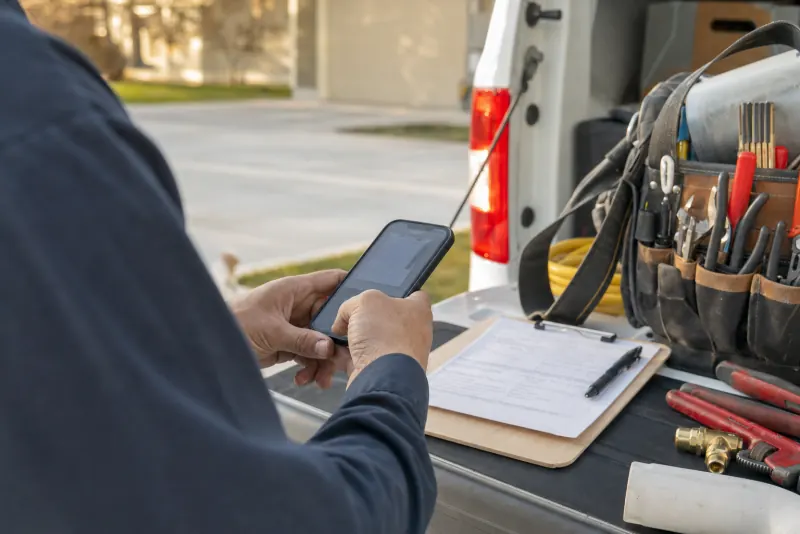
The crew keeps doing what they do now, plus one photo. The typing goes away. And when the handwriting is hard to read, the system doesn't guess: it asks a person.

A worker's hands holding a phone over a paper work order on a clipboard, on the open tailgate of a pickup next to a bag of tools.
  1. Snap it

    The tech photographs the signed work order before leaving the job.

  2. Read and entered

    Customer, job, hours and parts are read and entered in the job tracker, billing and payroll.

  3. A person checks the flags

    Anything unclear waits for the office to confirm. Nothing flagged goes through on a guess.

Work order 4417Read from photo
1 to checkExample
CustomerExample Property Co.
JobReplace water heater, 50 gallon
CrewCrew 2
Hours3.5Handwriting unclear: 3.5 or 5.5? Please confirm.
PartsWater heater, flex lines (2), relief valve
Signed by customerYes
After you confirm, it goes toJob tracker Billing Payroll
Confirm 3.5 hours Change it Typed once, by nobody.
Example screen. The business and details are made up.A person checks anything flagged
Example, illustrative. The fields, flags and destinations are set up around your own forms and systems.

04How a build works

A fixed price, built on your systems, tested with your real work.

Every build follows the recommendations from your AI process analysis, and every build runs the same way.

  1. Before work starts

    A fixed price

    You know the exact price before any work starts. Typically $2,500 to $15,000, depending on scope.

  2. No rip and replace

    Your systems first

    We start with the software you already use and connect it, instead of asking you to switch.

  3. Real tickets

    Tested with your real work

    Before it goes live, we run it on your actual tickets, forms and jobs, and fix what doesn't fit.

  4. With your people

    Shown how to use it

    We show your people how it works, at your place, so it actually gets used.

  5. Ongoing

    Into Your AI department

    If you want, it rolls into Your AI department: kept working, and upgraded as AI improves.

Book your free 30-minute consult

Step 1 is a conversation. Free, 30 minutes.

05A person stays in the loop

The computer does the typing. Your people make the calls.

A person stays in the loop for anything that matters. Our builds do the copying, entering and drafting. Anything that goes out to a customer, and anything the system isn't sure about, waits for one of your people.

The computer doesA person decides
Reads the ticket photo and fills in the fieldsConfirms anything flagged as unclear
Drafts the quote or invoiceChecks it, changes it and sends it
Drafts the reply to a customer emailApproves it before it goes out
Builds the Monday reportReads it and decides what to do
Answers after-hours calls and takes the messageCalls the customer back
Waiting for youTuesday morning
Example
  • Quote draft: fence repair, 140 feetDrafted from last night's site-visit notesReview and send
  • Reply to a customer: "Is my order in yet?"Status pulled from your order systemApproveEdit
  • Work order 4417: hours unclear3.5 or 5.5? Read from a photoConfirm
  • Invoice batch: 12 jobs finished yesterdayBuilt from the job tracker, ready to checkReview
Example screen. Every detail is made up.Nothing goes out without a person
Example. What a morning queue might look like. Your people approve, edit or send.

07Questions

Questions owners ask about automation.

Something not here? Call (801) 477-6186 and ask a real person.

See every question
7.1How much does a build cost?

Every build is a fixed price, typically $2,500 to $15,000 depending on scope. You know the exact price before any work starts.

7.2Do I have to replace the software we use now?

No. We start with the systems you already use and connect them. If something you use truly can't do the job, we'll explain why before anything changes.

7.3What if the AI gets something wrong?

That's why a person stays in the loop. Anything the system isn't sure about, like a smudged number on a photographed ticket, waits for one of your people to check it, and anything that goes out to a customer waits for approval. We also test every build with your real work before it goes live.

7.4Will my staff be able to use it?

That's the point of building around how your people already work. We test it with your real work and show your people how to use it, at your place.

7.5Can you build something that isn't on this list?

Often, yes. These are the most common builds, not the only ones. Tell us about the problem at the free consult, and we'll tell you plainly whether it's worth building.

7.6How do I get started?

With a free 30-minute consult, at your place or by phone. If there's something worth building, the $500 AI process analysis maps your processes and gives you prioritized recommendations, and you choose what gets built.

Got work your people do by hand every day? Pull up a chair.

Start with a free 30-minute consult, at your place or by phone. Show us the paper, the spreadsheet or the retyping, and we'll tell you plainly what a build would look like.

Book your free 30-minute consult

Free. 30 minutes. No obligation.